syllo/
View on GitHubGPU & Accelerator process monitoring for AMD, Apple, Huawei, Intel, NVIDIA and Qualcomm
GPU & Accelerator process monitoring for AMD, Apple, Huawei, Intel, NVIDIA and Qualcomm
NVTOP stands for Neat Videocard TOP, a (h)top like task monitor for GPUs and accelerators. It can handle multiple GPUs and print information about them in a htop-familiar way.
Currently supported vendors are AMD (Linux amdgpu driver), Apple (limited M1 & M2 support), Huawei (Ascend), Intel (Linux i915/Xe drivers), NVIDIA (Linux proprietary divers), Qualcomm Adreno (Linux MSM driver), Broadcom VideoCore (Linux v3d driver), Rockchip, MetaX (MXSML driver), Enflame (Linux EFML driver), Tenstorrent (Linux tt-kmd driver). Rockchip, MetaX (MXSML driver), Enflame (Linux EFML driver), Iluvatar CoreX (ixML / libixml).
Because a picture is worth a thousand words:
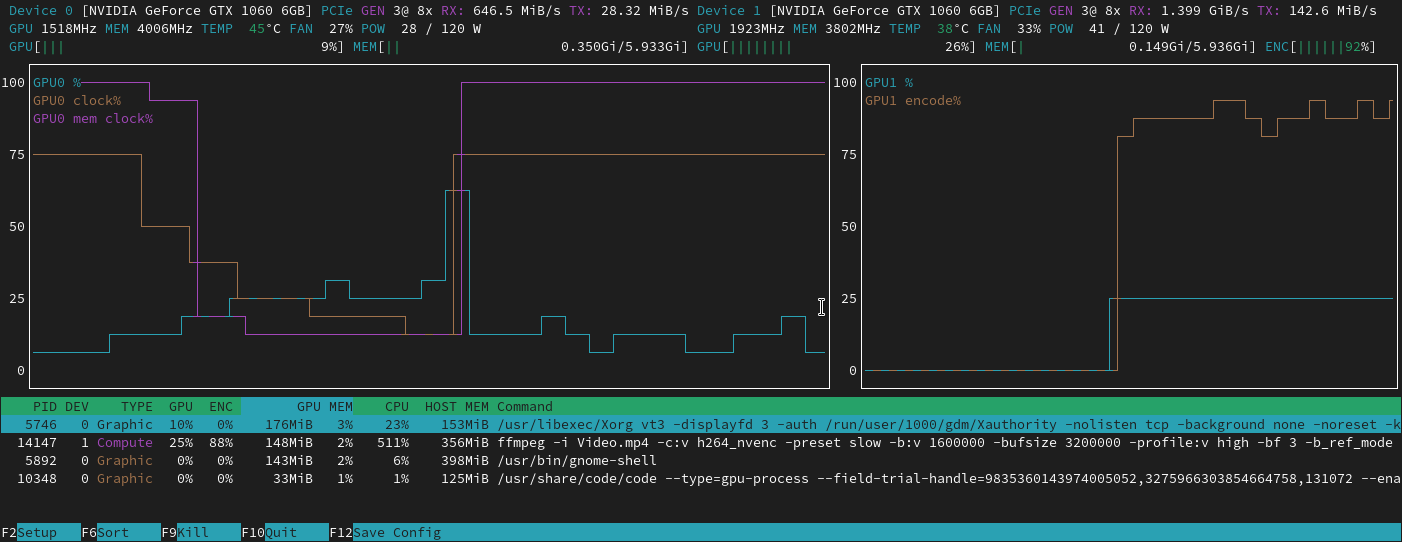
NVTOP has a builtin setup utility that provides a way to specialize the interface to your needs.
Simply press F2 and select the options that are the best for you.
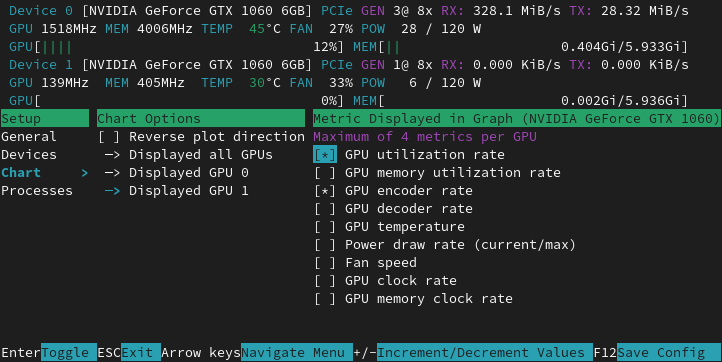
You can save the preferences set in the setup window by pressing F12.
The preferences will be loaded the next time you run nvtop.
NVTOP comes with a manpage!
man nvtop
For quick command line arguments help
nvtop -h
nvtop --help
NVTOP supports AMD GPUs using the amdgpu driver and the legacy radeon driver (legacy GPUs, limited support) through the exposed DRM and
sysfs interface.
The radeon provides limited metrics compared to amdgpu.
AMD introduced the fdinfo interface in kernel 5.14 (browse kernel source). Hence, you will need a kernel with a version greater or equal to 5.14 to see the processes using AMD GPUs.
Support for recent GPUs are regularly mainlined into the linux kernel, so please use a recent-enough kernel for your GPU.
NVTOP supports Intel GPUs using the i915 or xe linux driver.
Intel introduced the fdinfo interface in kernel 5.19 (browse kernel source). Hence, you will need a kernel with a version greater or equal to 5.19 to see the processes using Intel GPUs.
Intel requires CAP_PERFMON or CAP_SYS_ADMIN capabilities to access the total memory usage,
you can run sudo setcap cap_perfmon=ep nvtop to grant the necessary permissions or run nvtop as root.
The NVML library does not support some of the queries for GPUs coming before the Kepler microarchitecture. Anything starting at GeForce 600, GeForce 800M and successor should work fine. For more information about supported GPUs please take a look at the NVML documentation.
NVTOP supports Adreno GPUs using the msm linux driver.
msm introduced the fdinfo interface in kernel 6.0 (browse kernel source). Hence, you will need a kernel with a version greater or equal to 6.0 to see the processes using Adreno GPUs.
NVTOP includes some initial support for Apple using Metal. This is only supported when building for Apple, and when building for Apple only this vendor is supported.
APPLE SUPPORT STATUS
NVTOP supports Ascend (testing on Altas 800 (910B)) by DCMI API (version 6.0.0).
Currently, the DCMI only supports limited APIs, missing PCIe generation, tx/rx throughput info, max power draw etc.
NVTOP supports Iluvatar CoreX GPUs through the ixML library.
The backend dynamically loads libixml.so from /usr/local/corex/lib,
/usr/local/corex/lib64, or the default dynamic loader search path. The ixML
runtime exposes an NVML-compatible API surface used by NVTOP to query device,
power, PCIe, clock, temperature, memory, and process information.
NVTOP supports VideoCore (testing on raspberrypi 4B).
Supports GPU frequency, temperature, utilization, per-process utilization, GPU memory usage, and H264 decoding utilization.
On non-raspberry pi os, you need to use the linux-rpi 6.12.y kernel and above, and ensure the presence of the /dev/vcio device.
NVTOP supports Rockchip (testing on orangepi 5 plus).
Supports NPU frequency, temperature, utilization.
NVTOP supports MetaX (testing on MXC500) by MXSML LIBRARY.
For more information about GPUs please take a look at the METAX documentation
NVTOP supports Enflame GCUs (testing on Enflame S60, Enflame L300 and Enflame L600) by EFML LIBRARY
GCU, which refers to General Compute Unit, is a type of accelerator card that is used to perform general-purpose computing tasks just like GPGPU.
NVTOP supports Tenstorrent AI accelerators (Blackhole, Wormhole, Grayskull) through the tt-kmd kernel driver.
Supports temperature, power draw, AI clock, fan RPM, PCIe link info, and process listing. No external libraries required -- all data is read from sysfs, hwmon, and procfs.
Several libraries are required in order for NVTOP to display GPU info:
libixml.so) which comes with the driver.
If your distribution provides the snap utility, follow the snap installation process to obtain an up-to-date version of nvtop.
A standalone application is available as AppImage.
sudo apt install nvtop
A PPA supporting Ubuntu 20.04 and newer is provided by
Quentin Lienhardt that offers an up-to-date version of nvtop, enabled for NVIDIA, AMD and Intel.
sudo add-apt-repository ppa:quentiumyt/nvtop
sudo apt install nvtop
AMD and Intel Dependencies
sudo apt install libdrm-dev libsystemd-dev
# Ubuntu 18.04
sudo apt install libudev-dev
NVIDIA Dependency
NVTOP Dependencies
sudo apt install cmake libncurses5-dev libncursesw5-dev git
NVTOP
A standalone application is available as AppImage.
sudo dnf install nvtop
sudo dnf install -y https://dl.fedoraproject.org/pub/epel/epel-release-latest-$(rpm -E %{rhel}).noarch.rpm
sudo dnf install nvtop
sudo dnf install -y epel-release
sudo dnf install nvtop
AMD and Intel Dependencies
sudo dnf install libdrm-devel systemd-devel
NVIDIA Dependency
NVTOP Dependencies
sudo dnf install cmake ncurses-devel git gcc-c++
NVTOP
A standalone application is available as an AppImage.
Build process for OpenSUSE:
AMD Dependency
sudo zypper install libdrm-devel
NVIDIA Dependency
NVTOP Dependencies
sudo zypper install cmake ncurses-devel git
NVTOP
sudo pacman -S nvtop
sudo emerge -av nvtop
An AppImage is a standalone application. Just download the AppImage, make it executable and run it!
Go to the release page and download nvtop-x86_64.AppImage
# Go to the download location ** The path may differ on your system **
cd $HOME/Downloads
# Make the AppImage executable
chmod u+x nvtop-x86_64.AppImage
# Enjoy nvtop
./nvtop-x86_64.AppImage
If you are curious how that works, please visit the AppImage website.
snap install nvtop
# Add the capability to kill processes inside nvtop
snap connect nvtop:process-control
# Add the capability to inspect GPU information (fan, PCIe, power, etc)
snap connect nvtop:hardware-observe
# AMDGPU process list support (read /proc/<pid>)
snap connect nvtop:system-observe
# Temporary workaround to get per-process GPU usage (read /proc/<pid>/fdinfo)
snap connect nvtop:kubernetes-support
Notice: The connect commands allow
A conda-forge feedstock for nvtop is available.
conda install --channel conda-forge nvtop
pixi global install nvtop
NVIDIA drivers (same as above)
git clone https://github.com/Syllo/nvtop.git && cd nvtop
sudo docker build --tag nvtop .
sudo docker run -it --rm --runtime=nvidia --gpus=all --pid=host nvtop
Nvtop support in WSL2 mostly boils down to GPU/Accelerator vendor support of WSL2. Nvtop should work out of the box for the following configurations:
git clone https://github.com/Syllo/nvtop.git
mkdir -p nvtop/build && cd nvtop/build
cmake .. -DNVIDIA_SUPPORT=ON -DAMDGPU_SUPPORT=ON -DINTEL_SUPPORT=ON
make

# Install globally on the system
sudo make install

# Alternatively, install without privileges at a location of your choosing
# cmake .. -DNVIDIA_SUPPORT=ON -DAMDGPU_SUPPORT=ON -DINTEL_SUPPORT=ON -DCMAKE_INSTALL_PREFIX=/path/to/your/dir
# make
# make install
If you use conda as environment manager and encounter an error while building NVTOP, try conda deactivate before invoking cmake.
The build system supports multiple build types (e.g. -DCMAKE_BUILD_TYPE=RelWithDebInfo):
$TERM) by setting the field Terminal-type string to putty in the menu
Connection > Data > Terminal Details.NO GPU to monitor. for NVIDIA GPUs:
nvtop loads a shared library named libnvml.so (shipped with the NVIDIA
drivers) to querry device information. If the library is not present, nvtop
will not be able to monitor your NVIDIA device.WSL2, the installation instructions are slightly different since the
driver is being exposed by Windows to the virtual machine (see instruction
link in the WSL2 section). If you install the NVIDIA linux drivers
inside WSL2, you may encounter a version mismatch error or nvtop may silently
not work at all.NVTOP is licensed under the GPLv3 license or any later version. You will find a copy of the license inside the COPYING file of the repository or at the GNU website <www.gnu.org/licenses/>.
No comments yet. Set the tone — say what you would want to know.