koala73/
View on GitHubReal-time global intelligence dashboard. AI-powered news aggregation, geopolitical monitoring, and infrastructure tracking in a unified situational awareness interface
Real-time global intelligence dashboard. AI-powered news aggregation, geopolitical monitoring, and infrastructure tracking in a unified situational awareness interface
Real-time global intelligence dashboard — AI-powered news aggregation, geopolitical monitoring, and infrastructure tracking in a unified situational awareness interface.







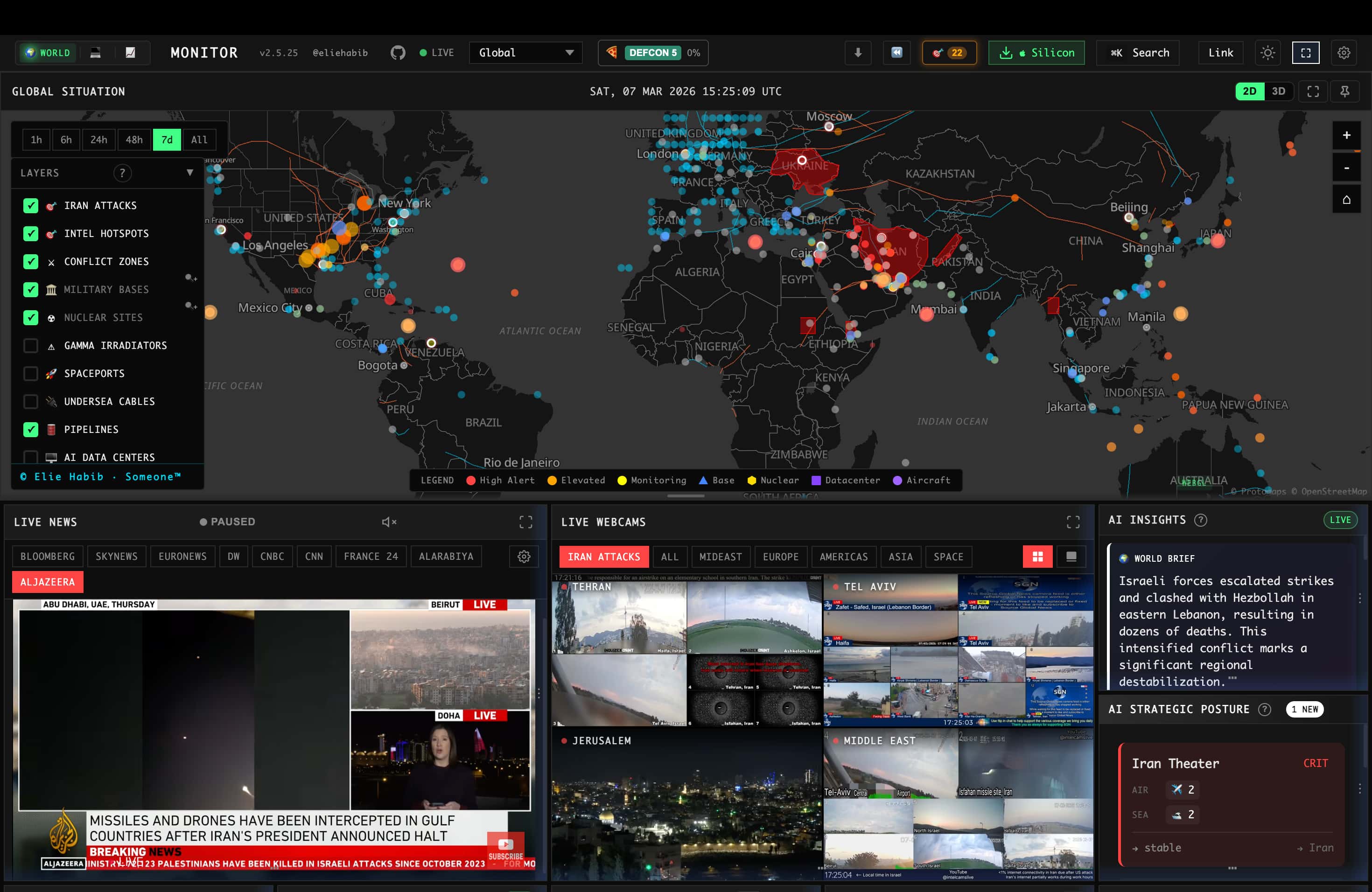
For the full feature list, architecture, data sources, and algorithms, see the documentation.
All site variants and desktop binaries are built from a single codebase and ship from the same release process. The table below clarifies maintenance status so you know which surfaces are safe to depend on.
| Surface | Status | Notes |
|---------|--------|-------|
| worldmonitor.app, tech., finance., commodity., happy., energy. | Stable | Public deployments built from this repo, actively maintained |
| Desktop binaries (Windows / macOS Apple Silicon / macOS Intel / Linux AppImage) | Stable | One Tauri binary for every variant — install World Monitor and switch to tech, finance, commodity, energy, or happy in-app. There is deliberately no per-variant download |
Issues filed against any of the above are triaged from the same backlog — see the issues board for currently-open work.
git clone https://github.com/koala73/worldmonitor.git
cd worldmonitor
npm install
npm run dev
Open localhost:3000 (override the port with DEV_PORT in .env.local). The app runs with no environment variables.
Feature-specific data sources may require credentials. See .env.example for the full list.
For variant-specific development:
npm run dev:tech       # tech.worldmonitor.app
npm run dev:finance    # finance.worldmonitor.app
npm run dev:commodity  # commodity.worldmonitor.app
npm run dev:happy      # happy.worldmonitor.app
npm run dev:energy     # energy.worldmonitor.app
See the self-hosting guide for deployment options (Vercel, Docker, static).
| Category | Technologies | |----------|-------------| | Frontend | Vanilla TypeScript, Vite, globe.gl + Three.js, deck.gl + MapLibre GL | | Desktop | Tauri 2 (Rust) with Node.js sidecar | | AI/ML | Ollama / Groq / OpenRouter, Transformers.js (browser-side) | | API Contracts | Protocol Buffers and sebuf HTTP annotations | | Deployment | Vercel Edge Functions, Railway relay, Tauri, PWA | | Caching | Redis (Upstash), 3-tier cache, CDN, service worker |
Full stack details in the architecture docs.
World Monitor is built for agents and scripts as well as browsers:
MCP server — https://worldmonitor.app/mcp (Streamable HTTP). Public tools/list; tools/call authenticates with a X-WorldMonitor-Key header or OAuth.
The server also publishes its Agent Skills through the draft io.modelcontextprotocol/skills extension (skills/list, skills/get, and skill://… resource reads).
REST API — base https://api.worldmonitor.app, described by the OpenAPI spec.
CLI — the official worldmonitor npm package (source in cli/):
npx worldmonitor tools          # run ad-hoc — list every MCP tool (no key needed)
npm install -g worldmonitor     # or install the `worldmonitor` (alias `wm`) command
worldmonitor risk IR --api-key wm_xxx
SDKs — official zero-dependency client libraries mirroring the CLI: Python worldmonitor-sdk (source in sdk/python/), Ruby worldmonitor (sdk/ruby/), Go github.com/koala73/worldmonitor/sdk/go (sdk/go/). Guide: worldmonitor.app/docs/sdks.
Agent discovery files: llms.txt · agent-skills manifest · api-catalog. Get an API key at worldmonitor.app/pro.
Flight data provided graciously by Wingbits, the most advanced ADS-B flight data solution.
WorldMonitor aggregates attributed upstream sources across geopolitics, finance, energy, climate, aviation, cyber, military, infrastructure, and news intelligence. Curated feeds and freshness-tracked source groups are published in the full data sources catalog, with provider, feed-tier, license-posture, and collection-method details.
Contributions welcome! See CONTRIBUTING.md for guidelines.
npm run typecheck        # Type checking
npm run build:full       # Production build
AGPL-3.0-only for the source code. Commercial use is permitted under the AGPL when you comply with its copyleft and source-availability terms.
| Use Case | Allowed? | |----------|----------| | Personal / research / educational | Yes, under AGPL-3.0-only | | Self-hosted instance | Yes, under AGPL-3.0-only | | Fork and modify | Yes, share source under AGPL-3.0-only when required | | Commercial use / SaaS | Yes, under AGPL-3.0-only when you comply with AGPL obligations | | Private-source proprietary use or official branding rights | Separate commercial or trademark permission needed |
See LICENSE for the full code license and docs/license.mdx for a plain-language summary. Commercial licensing is available as an alternative option for teams that need non-AGPL terms.
Copyright (C) 2024-2026 Elie Habib. All rights reserved.
Elie Habib — GitHub
We thank the following researchers for responsibly disclosing security issues:
See our Security Policy for responsible disclosure guidelines.
No comments yet. Set the tone — say what you would want to know.