farion1231/
View on GitHubA cross-platform desktop All-in-One assistant for Claude Code, Codex, OpenCode, OpenClaw, Grok Build & Hermes Agent. Only official website: ccswitch.io
A cross-platform desktop All-in-One assistant for Claude Code, Codex, OpenCode, OpenClaw, Grok Build & Hermes Agent. Only official website: ccswitch.io



English | 中文 | 日本語 | Deutsch | Changelog

Kimi K3 is Moonshot AI's most capable model and the world's first open 3T-class model. With 2.8 trillion parameters, native vision, and a 1-million-token context window, K3 delivers frontier performance across long-horizon coding, knowledge work, and reasoning. CC Switch makes it easy to configure and switch to Kimi across agentic tools. Click here to start using Kimi
New user top-up bonus: register via this link and complete your first top-up to receive 10% of the amount as bonus API credit, up to CNY ¥1,000.
Doing mostly coding work? Try the Kimi Code subscription.
Modern AI-powered coding relies on tools like Claude Code, Claude Desktop, Codex, Gemini CLI, Grok Build, OpenCode, OpenClaw, and Hermes — but each has its own configuration format. Switching API providers means manually editing JSON, TOML, or .env files, and there is no unified way to manage MCP and Skills across multiple tools.
CC Switch gives you a single desktop app to manage all supported AI tools. Instead of editing config files by hand, you get a visual interface to import providers with one click, switch between them instantly, with 50+ built-in provider presets, unified MCP and Skills management, and system tray quick switching — all backed by a reliable SQLite database with atomic writes that protect your configs from corruption.
| Main Interface | Add Provider |
| :-----------------------------------------------: | :--------------------------------------------: |
| 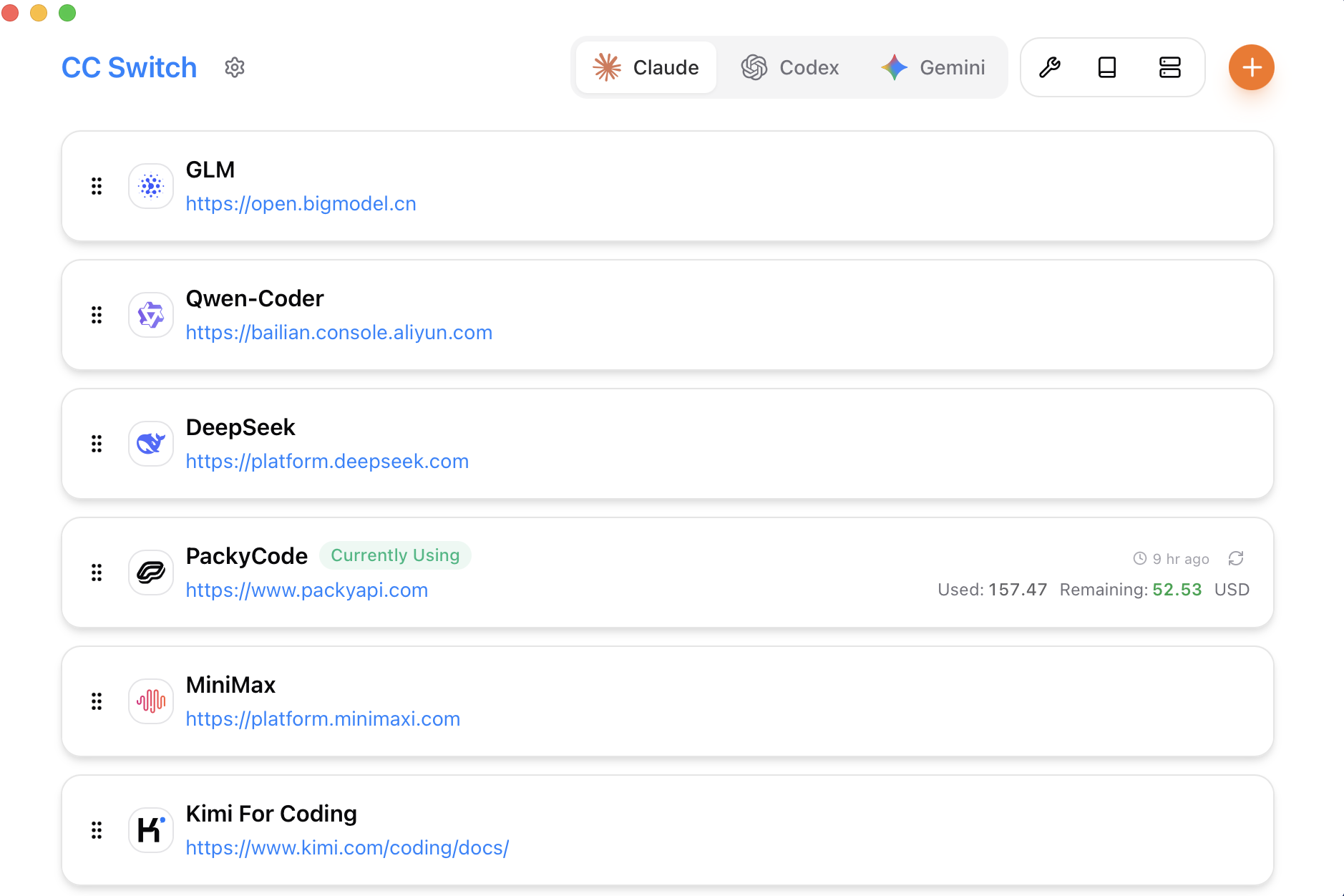 |
| 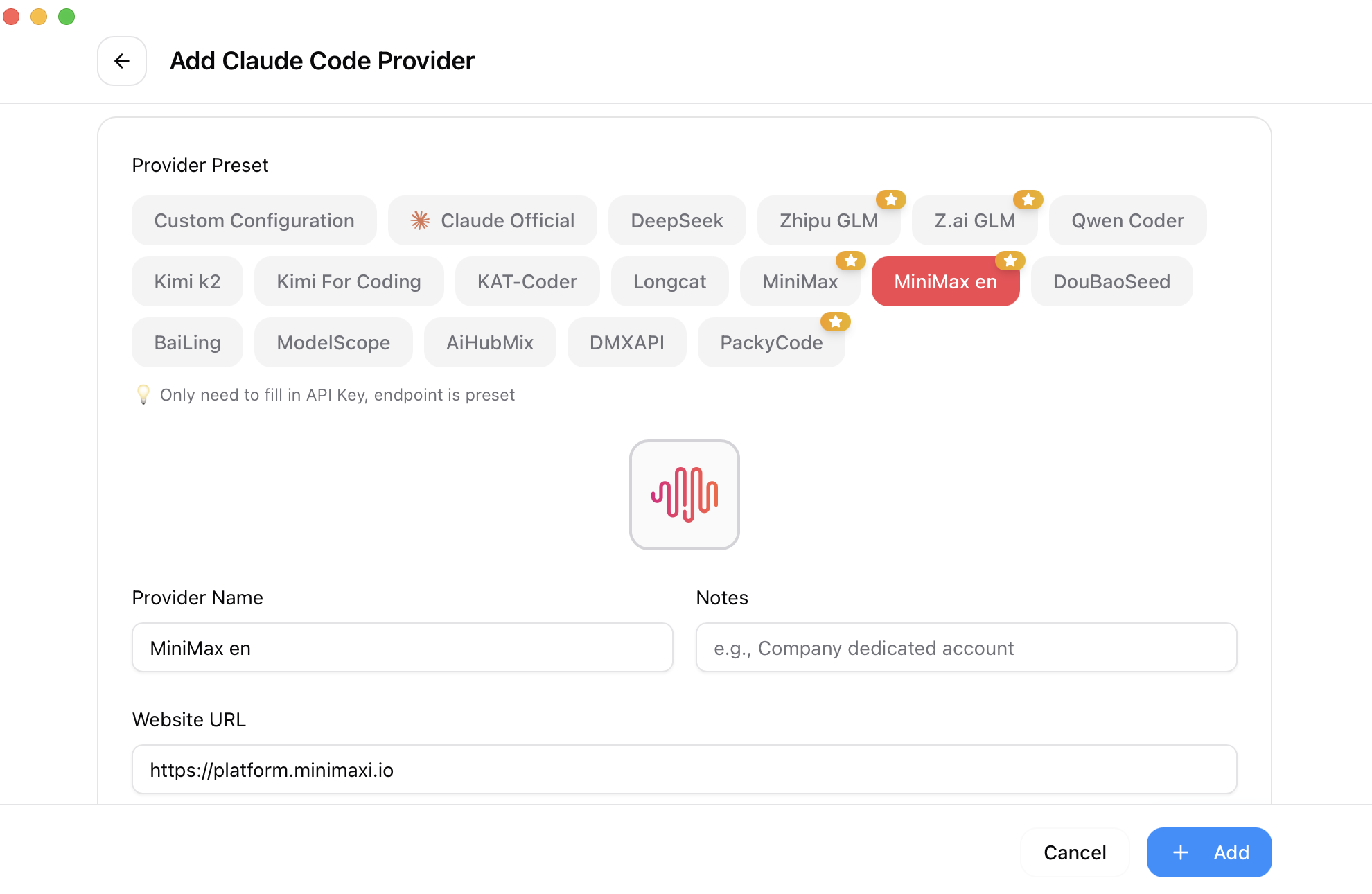 |
|
Full Changelog | Release Notes
ccswitch://) — Import providers, MCP servers, prompts, and skills via URLCC Switch supports eight tools: Claude Code, Claude Desktop, Codex, Gemini CLI, Grok Build, OpenCode, OpenClaw, and Hermes. Each tool has dedicated provider presets and configuration management.
For most tools, yes — restart your terminal or the CLI tool for changes to take effect. The exception is Claude Code, which currently supports hot-switching of provider data without a restart.
CC Switch provides a "Shared Config Snippet" feature to pass common data (beyond API keys and endpoints) between providers. Go to "Edit Provider" → "Shared Config Panel" → click "Extract from Current Provider" to save all common data. When creating a new provider, check "Write Shared Config" (enabled by default) to include plugin data in the new provider. All your configuration items are preserved in the default provider imported when you first launched the app.
CC Switch for macOS is code-signed and notarized by Apple. You can download and install it directly — no extra steps needed. We recommend using the .dmg installer.
CC Switch follows a "minimal intrusion" design principle — even if you uninstall the app, your CLI tools will continue to work normally. The system always keeps one active configuration, because deleting all configurations would make the corresponding CLI tool unusable. If you rarely use a specific CLI tool, you can hide it in Settings. To switch back to official login, see the next question.
Add an official provider from the preset list. After switching to it, run the Log out / Log in flow, and then you can freely switch between the official provider and third-party providers. Codex supports switching between different official providers, making it easy to switch between multiple Plus or Team accounts.
~/.cc-switch/cc-switch.db (SQLite — providers, MCP, prompts, skills)~/.cc-switch/settings.json (device-level UI preferences)~/.cc-switch/backups/ (auto-rotated, keeps 10 most recent)~/.cc-switch/skills/ (symlinked to corresponding apps by default)~/.cc-switch/skill-backups/ (created automatically before uninstall, keeps 20 most recent)The AppImage forces GDK_BACKEND=x11 (XWayland) to avoid a historical native-Wayland crash. On newer Wayland + NVIDIA setups this can leave the web content area unclickable (the title-bar buttons still work) and black-screen on resize. Launch with the opt-in escape hatch to switch back to native Wayland:
CC_SWITCH_GDK_BACKEND=wayland ./CC-Switch-*.AppImage
If you launch from a desktop icon, add it to the .desktop Exec= line (e.g. env CC_SWITCH_GDK_BACKEND=wayland /path/to/AppImage) or set it in your session environment. The variable is generic: on tiling Wayland compositors (sway/Hyprland) where clicks don't register, try CC_SWITCH_GDK_BACKEND=x11 instead. Leaving it unset keeps the default behavior.
For detailed guides on every feature, check out the User Manual — covering provider management, MCP/Prompts/Skills, proxy & failover, and more.
Note: On first launch, you can manually import existing CLI tool configs as the default provider.
Download the latest CC-Switch-v{version}-Windows.msi installer or CC-Switch-v{version}-Windows-Portable.zip portable version from the Releases page.
Method 1: Install via Homebrew (Recommended)
brew install --cask cc-switch
Update:
brew upgrade --cask cc-switch
Method 2: Manual Download
Download CC-Switch-v{version}-macOS.dmg (recommended) or .zip from the Releases page.
Note: CC Switch for macOS is code-signed and notarized by Apple. You can install and open it directly.
Install via paru (Recommended)
paru -S cc-switch-bin
Download the latest Linux build from the Releases page:
CC-Switch-v{version}-Linux.deb (Debian/Ubuntu)CC-Switch-v{version}-Linux.rpm (Fedora/RHEL/openSUSE)CC-Switch-v{version}-Linux.AppImage (Universal)Flatpak: Not included in official releases. You can build it yourself from the
.deb— seeflatpak/README.mdfor instructions.
┌─────────────────────────────────────────────────────────────┐
│                    Frontend (React + TS)                    │
│  ┌─────────────┐  ┌──────────────┐  ┌──────────────────┐    │
│  │ Components  │  │    Hooks     │  │  TanStack Query  │    │
│  │   (UI)      │──│ (Bus. Logic) │──│   (Cache/Sync)   │    │
│  └─────────────┘  └──────────────┘  └──────────────────┘    │
└────────────────────────┬────────────────────────────────────┘
                         │ Tauri IPC
┌────────────────────────▼────────────────────────────────────┐
│                  Backend (Tauri + Rust)                     │
│  ┌─────────────┐  ┌──────────────┐  ┌──────────────────┐    │
│  │  Commands   │  │   Services   │  │  Models/Config   │    │
│  │ (API Layer) │──│ (Bus. Layer) │──│     (Data)       │    │
│  └─────────────┘  └──────────────┘  └──────────────────┘    │
└─────────────────────────────────────────────────────────────┘
Core Design Patterns
~/.cc-switch/cc-switch.db (SQLite)Key Components
# Install dependencies
pnpm install

# Dev mode (hot reload)
pnpm dev

# Type check
pnpm typecheck

# Format code
pnpm format

# Check code format
pnpm format:check

# Run frontend unit tests
pnpm test:unit

# Run tests in watch mode (recommended for development)
pnpm test:unit:watch

# Build application
pnpm build

# Build debug version
pnpm tauri build --debug
cd src-tauri

# Format Rust code
cargo fmt

# Run clippy checks
cargo clippy

# Run backend tests
cargo test

# Run specific tests
cargo test test_name

# Run tests with test-hooks feature
cargo test --features test-hooks
Frontend Testing:
Running Tests:
# Run all tests
pnpm test:unit

# Watch mode (auto re-run)
pnpm test:unit:watch

# With coverage report
pnpm test:unit --coverage
Frontend: React 18 · TypeScript · Vite · TailwindCSS 3.4 · TanStack Query v5 · react-i18next · react-hook-form · zod · shadcn/ui · @dnd-kit
Backend: Tauri 2.8 · Rust · serde · tokio · thiserror · tauri-plugin-updater/process/dialog/store/log
Testing: vitest · MSW · @testing-library/react
├── src/                        # Frontend (React + TypeScript)
│   ├── components/
│   │   ├── providers/          # Provider management
│   │   ├── mcp/                # MCP panel
│   │   ├── prompts/            # Prompts management
│   │   ├── skills/             # Skills management
│   │   ├── sessions/           # Session Manager
│   │   ├── proxy/              # Proxy mode panel
│   │   ├── openclaw/           # OpenClaw config panels
│   │   ├── settings/           # Settings (Terminal/Backup/About)
│   │   ├── deeplink/           # Deep Link import
│   │   ├── env/                # Environment variable management
│   │   ├── universal/          # Cross-app configuration
│   │   ├── usage/              # Usage statistics
│   │   └── ui/                 # shadcn/ui component library
│   ├── hooks/                  # Custom hooks (business logic)
│   ├── lib/
│   │   ├── api/                # Tauri API wrapper (type-safe)
│   │   └── query/              # TanStack Query config
│   ├── locales/                # Translations (zh/zh-TW/en/ja)
│   ├── config/                 # Presets (providers/mcp)
│   └── types/                  # TypeScript definitions
├── src-tauri/                  # Backend (Rust)
│   └── src/
│       ├── commands/           # Tauri command layer (by domain)
│       ├── services/           # Business logic layer
│       ├── database/           # SQLite DAO layer
│       ├── proxy/              # Proxy module
│       ├── session_manager/    # Session management
│       ├── deeplink/           # Deep Link handling
│       └── mcp/                # MCP sync module
├── tests/                      # Frontend tests
└── assets/                     # Screenshots & partner resources
Issues and suggestions are welcome!
Before submitting PRs, please ensure:
pnpm typecheckpnpm format:checkpnpm test:unitFor new features, please open an issue for discussion before submitting a PR. PRs for features that are not a good fit for the project may be closed.
MIT © Jason Young

No comments yet. Set the tone — say what you would want to know.